On an F3K glider, camber presets come down to one or two degrees of flap. Optiservo is a small online calculator that helps you design the servo → flap linkage so that those few degrees are fine and repeatable, while keeping the throw you need for butterfly.
The problem: lots of throw, but precision where you fly
A flap linkage has to do two conflicting things:
- tiny presets (Speed, Cruise, Thermal, Zoom): a few degrees around neutral, which you want to trim finely and get back exactly from one flight to the next;
- a large downward throw for butterfly on landing, often 60° or more.
But a servo only has limited resolution. It all comes down to the geometry of the servo arm, the control horn and the pushrod: it decides how many degrees of servo you spend per degree of flap, and where along the travel.
The trick: offset the servo arm at neutral
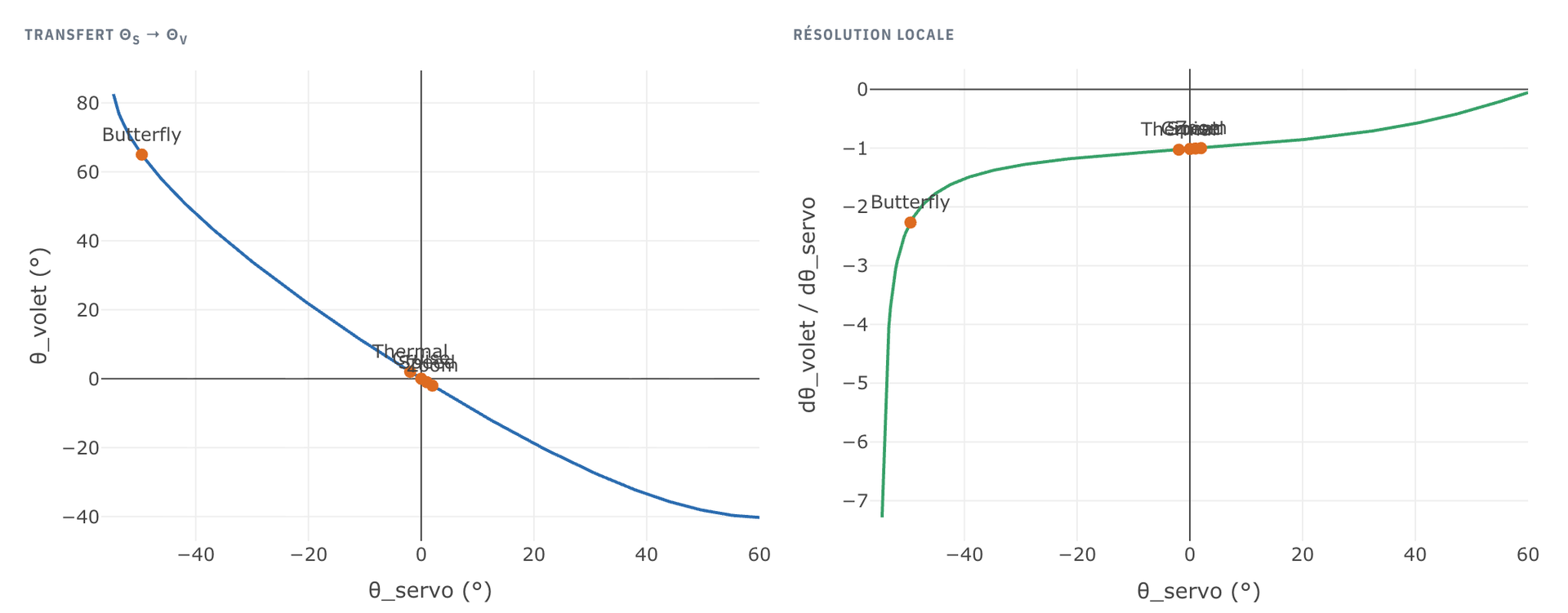
If the servo arm is not perpendicular to the pushrod at neutral but tilted by an angle αs, the flap moves more slowly around neutral: resolution there improves by a factor of about 1/cos(αs). You gain precision exactly where the presets are.
The price: the linkage becomes non-linear and asymmetric, and part of the travel available for butterfly is lost. Finding the right trade-off by hand, with a protractor and trial and error, is tedious. Optiservo does that calculation for you.

What Optiservo does
- Three use cases: “Simple” (control surface, rudder, elevator), “Wing” (servo buried in the airfoil, typical F3K) and “Wing with external servo” (servo in the fuselage, long pushrod, more F5J or thermal). The interface only shows what applies to your case.
- Exact kinematics: the servo → pushrod → horn → flap mechanism is solved as a true four-bar linkage, with no small-angle approximation. The tool also flags positions where the linkage locks up or reverses.
- The resolution curve over the full servo travel, with your presets plotted on it: you see right away whether they fall in a fine or a coarse zone.
- An optimizer that sweeps the servo arm offset angle and suggests the best one, while meeting the butterfly throw you asked for and the aileron throw.
- The EdgeTX correction curve: the tool inverts the geometry to linearize (or symmetrize) the flap response, and outputs a 5 to 17 point curve to copy into EdgeTX Companion.
- A realistic section view: airfoil imported from airfoiltools.com or from a .dat file, servo body, mounting plate, clevises. You check at a glance that the arm or the clevis doesn't stick out of the skin.
- Two linkage types: arm + pushrod, or pulley + cable with a return spring.
In practice
- Pick your use case.
- Measure your hardware and enter it: servo arm and horn length, servo and hinge position, wing and flap chord. The default values are generic: they don't replace your own measurements.
- Load your airfoil to see the mechanism in place.
- Enter your presets and the butterfly throw you want, then run the servo arm angle optimization.
- Check the curves and the section view, then export the EdgeTX curve.
Free, with an account to save
The calculation, the optimization, the EdgeTX export and the share link are free, with no sign-up. With an aircmic account (Google sign-in), you can also save your projects, find them on any device from your account, and export or import them as JSON.
What the tool doesn't do
- The model is 2D: flap twist and arm flex under load are not taken into account.
- There is no aerodynamic load calculation on the flap.
- No drawing export (STL, DXF) for now: only the on-screen diagram and the EdgeTX curve.
A comment, a bug, an idea? That's what the contact form is for.